
 QA Focus Briefing Documents: Print All - Web
 [ Home Page - Surveys - Documents - Presentations - Search ]
This page is for printing out the briefing papers on the area of Web/access. Please note that some of the internal links may not work.
You should ensure that your Web site complies with HTML standards. This will involve selecting the standard for your Web site (which currently should be either HTML 4.0 or XHTML 1.0); implementing publishing procedures which will ensure that your Web pages comply with the standard and quality assurance procedures to ensure that your publishing processes work correctly [1] [2].
You should make use of CSS (Cascading Style Sheets) to define the appearance of your HTML pages. You should seek to avoid use of HTML formatting elements (e.g. avoid spacer GIFs, <font> tags, etc.) - although it is recognised that use of tables for formatting may be necessary in order to address the poor support for CSS-positioning in some Web browsers. You should also ensure that your CSS is compliant with appropriate standards [3].
You should provide a search facility for your Web site if it contains more than a few pages [4].
You should aim to ensure that the 404 error page for your Web site is not the default page but has been configured with appropriate branding, advice and links to appropriate resources, such as the search facility [5].
You should ensure that you have a URI naming policy for your Web site [6].
You should ensure that you check for broken links on your Web site. You should ensure that links work correctly when pages are created or updated. You should also ensure that you have a link checking policy which defines the frequency for checking links and your policy when broken links are detected [7].
You should address the accessibility of your Web site from the initial planning stages. You should ensure that you carry out appropriate accessibility testing and that you have an accessibility policy [8].
You should address the usability of your Web site from the initial planning stages. You should ensure that you carry out appropriate usability testing and that you have a usability policy.
You should make use of several browsers for testing the accessibility, usability and functionality of your Web site. You should consider making use of mainstream browsers (Internet Explorer and FireFox) together with more specialist browsers such as Opera.
You should ensure that you have appropriate quality assurance procedures for your Web site [9] [10].
Below are some key pointers that can help you enhance the quality assurance procedures used for your Web site.
Are the tools that you use to create your Web site appropriate for their tasks? Do they produce compliant and accessible code? Can the tools be configured to incorporate QA processes such as HTML validation, link checking, spell checking, etc? If not, perhaps you should consider evaluating other authoring tools or alternative approaches to creating and maintaining your content.
How do you deal with problem reporting? Consider implementing a fault reporting log. Make sure that all defects are reported, that ownership is assigned, details are passed on to the appropriate person, a schedule for fixes is decided upon, progress made is recorded and the resolution of problem is noted. There could also be a formal signing off procedure.
A model such as the QA Focus Timescale Model will help you to plan the QA you will need to implement over the course of your project:
There are a variety of tools out there for use and a number are open source or free to use. These can be used for HTML and CSS validation, link checking, measuring load times, etc.
Manual approaches to Web site testing can address areas which will not be detecting through use of automated tools. You should aim to test key areas of your Web site and ensure that systematic errors which are found are addressed in areas of the Web site which are not tested.
A benchmarking approach involves comparisons of the findings for your Web site with your peers. This enables comparisons to be made which can help you identify areas in which you may be successful and also areas in which you may be lagging behind your peers.
You could give a severity rating to problems found to decide whether the work be done now or it can wait till the next phase of changes. An example rating system might be:
Make sure that you do not just fix problems you find. Recognising why the problems have occurred allows you to improve your publishing processes so that the errors do not reoccur.
The following resources provide additional advice on quality assurance for Web sites.
Before creating a Web site for your project you should give some thought to the purpose of the Web site, including the aims of the Web site, the target audiences, the lifetime, resources available to develop and maintain the Web site and the technical architecture to be used. You should also think about what will happen to the Web site once project funding has finished.
Your project Web site could have a number of purposes. For example:
Your Web site could, of course, fulfill more than a single role. Alternatively you may choose to provide more than one Web site.
You should have an idea of the purposes of your project Web site before creating it for a number of reasons:
Once funding has been approved for your project Web site you may wish to provide information about the project, often prior to the official launch of the project and before project staff are in post. There is a potential danger that this information will be indexed by search engines or treated as the official project page. You should therefore ensure that the page is updated once an official project Web site is launched so that a link is provided to the official project page. You may also wish to consider stopping search engines from indexing such pages by use of the Standard For Robot Exclusion [1].
Many projects will have an official project Web site. This is likely to provide information about the project such as details of funding, project timescales and deliverables, contact addresses, etc. The Web site may also provide access to project deliverables, or provide links to project deliverables if they are deployed elsewhere or are available from a repository. Usually you will be proactive in ensuring that the official project Web site is easily found. You may wish to submit the project Web site to search engines.
Projects with several partners may have a Web site which is used to support communications with project partners. The Web site may provide access to mailing lists, realtime communications, decision-making support, etc. The JISCMail service may be used or commercial equivalents such as YahooGroups. Alternatively this function may be provided by a Web site which also provides a repository for project resources.
Projects with several partners may have a Web site which is used to provide a repository for project resources. The Web site may contain project plans, specifications, minutes of meetings, reports to funders, financial information, etc. The Web site may be part of the main project Web site, may be a separate Web site (possibly hosted by one of the project partners) or may be provided by a third party. You will need to think about the mechanisms for allowing access to authorised users, especially if the Web site contains confidential or sensitive information.
Once you have agreed on the purpose(s) of your project Web site(s) [1] you will need to choose a domain name for your Web site and conventions for URIs. It is necessary to do this since this can affect (a) The memorability of the Web site and the ease with which it can be cited; (b) The ease with which resources can be indexed by search engines and (c) The ease with which resources can be managed and repurposed.
You may wish to make use of a separate domain name for your project Web site. If you wish to use a .ac.uk domain name you will need to ask UKERNA. You should first check the UKERNA rules [2]. A separate domain name has advantages (memorability, ease of indexing and repurposing, etc) but t his may not be appropriate, especially for short-term projects. Your organisation may prefer to use an existing Web site domain.
You should develop a policy for URIs for your Web site which may include:
It is strongly recommended that you make use of directories to group related
resources. This is particularly important for the project Web site itself and for
key areas of the Web site. The entry point for the Web site and key areas should
be contained in the directory itself: e.g. use http://www.foo.ac.uk/bar/
to refer to project BAR and not http://www.foo.ac.uk/bar.html) as
this allows the bar/ directory to be processed in its entirety, independently or
other directories. Without this approach automated tools such as indexing software,
and tools for auditing, mirroring, preservation, etc. would process other directories.
You should seek to ensure that URIs are persistent. If you reorganise your Web site you are likely to find that internal links may be broken, that external links and bookmarks to your resources are broken, that citations to resources case to work. Y ou way wish to provide a policy on the persistency of URIs on your Web site.
Ideally the address of a resource (the URI) will be independent of the format of the resource. Using appropriate Web server configuration options it is possible to cite resources in a way which is independent of the format of the resource. This should allow easy of migration to new formats (e.g. HTML to XHTML) and, using a technology known as Transparent Content Negotiation [3] provide access to alternative formats (e.g. HTML or PDF) or even alternative language versions.
Ideally URIs will be independent of the technology used to provide access to
the resource. If server-side scripting technologies are given in the file extension
for URIs (e.g. use of .asp, .jsp, .php, .cfm, etc. extensions) changing
the server-side scripting technology would probably require changing URIs. This
may also make mirroring and repurposing of resources more difficult.
Ideally URIs will be memorable and allow resources to be easily indexed and repurposed. However use of Content Management Systems or databases to store resources often necessitates use of URIs which contain query strings containing input parameters to server-side applications. As described above this can cause problems.
You should consider the following approaches which address some of the concerns:
Compliance with HTML standards is needed for a number of reasons:
The World Wide Web Consortium, W3C, recommend use of the XHTML 1.0 (or higher) standard. This has the advantage of being an XML application (allowing use of XML tools) and can be rendered by most browsers. However authoring tools in use may not yet produce XHTML. Therefore HTML 4.0 may be used.
Cascading style sheets (CSS) should be used in conjunction with XHTML/HTML to describe the appearance of Web resources.
Web resources may be created in a number of ways. Often HTML authoring tools such as DreamWeaver, FrontPage, etc. are used, although experienced HTML authors may prefer to use a simple editing tool. Another approach is to make use of a Content Management System. An alternative approach is to convert proprietary file formats (e.g. MS Word or PowerPoint). In addition sometimes proprietary formats are not converted but are stored in their native format.
A number of approaches may be taken to monitoring compliance with HTML standards. For example you can make use of validation features provided by modern HTML authoring tools, use desktop compliance tools or Web-based compliance tools.
The different types of tools can be used in different ways. Tools which are integrated with a HTML authoring tool should be used by the page author. It is important that the author is trained to use such tools on a regular basis. It should be noted that it may be difficult to address systematic errors (e.g. all files missing the DOCTYPE declaration) with this approach.
A popular approach is to make use of SSIs (server-side includes) to retrieve common features (such as headers, footers, navigation bars, etc.). This can be useful for storing HTML elements (such as the DOCTYPE declaration) in a manageable form. However this may cause validation problems if the SSI is not processed.
Another approach is to make use of a Content Management System (CMS) or similar server-side technique, such as retrieving resources from a database. In this case it is essential that the template used by the CMS complies with standards.
It may be felt necessary to separate the compliance process from the page authoring. In such cases use of a dedicated HTML checker may be needed. Such tools are often used in batch, to validate multiple files. In many cases voluminous warnings and error messages may be provided. This information may provide indications of systematic errors which should be addressed in workflow processes.
An alternative approach is to use Web-based checking services. An advantage with this approach is that the service may be used in a number of ways: the service may be used directly by entering the URL of a resource to be validated or live access to the checking service may be provided by including a link from a validation icon as used at <http://www.ukoln.ac.uk/qa-focus/> as shown in Figure 1 (this approach could be combined with use of cookies or other techniques so that the icon is only displayed to an administrator).
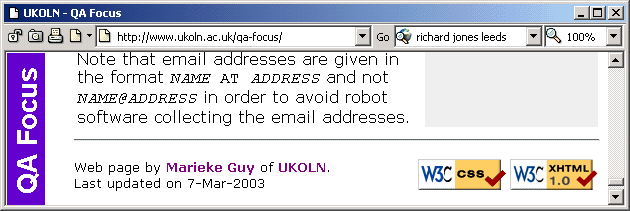
Another approach is to configure your Web server so that users can access the validation service by appending an option to the URL. For further information on this technique see the QA Focus briefing document A URI Interface To Web Testing Tools> at <http://www.ukoln.ac.uk/qa-focus/documents/briefings/briefing-59/>. This technique can be deployed with a simple option on your Web server's configuration file.
This document describes the current recommended versions of HTML. The advantages of XHTML 1.0 are given together with potential challenges in deploying XHTML 1.0 so that it follows best practices.
HTML has evolved since it was first created, responding to the need to provide richer functionality, maximise its accessibility and allow it to integrate with other architectural developments. The final version of the HTML language is HTML 4.0. This version is mature and widely supported, with a wide range of authoring tools available and support provided in Web browsers.
However HTML has limitation: HTML resources cannot easily be reused; it is difficult to add new features to the HTML language; it is difficult to integrate HTML pages with other markup languages (e.g. MathML for including mathematical expressions, SVG for including scalable vector graphics, etc).
XHTML was developed address these concerns. XHTML is the HTML language described in the XML language. This means that the many advantages of XML (ability to reuse resources using the XSLT language; ability to integrate other XML application, etc.) are available for authors creating conventional Web pages.
In order to support migration from HTML to a richer XHTML world, XHTML has been designed so that it is backwards compatible with the current Web browsers.
Since XHTML 1.0 provides many advantages and can be accessed by current browsers it would seem that use of XHTML 1.0 is recommended. However there are a number of issues which need to be addressed before deploying XHTML 1.0 for your Web site.
Although HTML pages should comply with the HTML standard, browsers are expected to be tolerant of errors. Unfortunately this has led to an environment in which many HTML resources are non-compliant. This environment makes it difficult to repurpose HTML by other applications. It also makes rendering of HTML resources more time-consuming than it should, since browsers have to identify errors and seek to render them in a sensible way.
The XML language, by contrast, mandates that XML resources comply with the standard. This has several advantages: XML resources will be clean enabling the resources to be more easily reused by other applications; applications will be able to process the resources more rapidly; etc. Since XHTML is an XML application an XHTML resource must be compliant in order for it to be processed as XML.
Web browsers identify file formats by checking the resource's MIME type. HTML resources use a text/html MIME type. XHTML resources may use this MIME type; however the resources will not be processed as XML, therefore losing the benefits provided by XML. Use of the application/xhtml+xml MIME type allows resources to be processed as XML. This MIME type is therefore recommended if you wish to exploit XML's potential.
You should be aware of implementation issues before deploying XHTML 1.0:
Use of XHTML 1.0 and the application/xhtml+xml MIME type provides a richer, more reusable Web environment. However there are challenges to consider in deploying this approach. Before deploying XHTML you must ensure that you have addressed the implementation difficulties.
This document reviews the importance of Cascading Style Sheets (CSS) and highlights the importance of ensuring that use of CSS complies with CSS standards.
Use of CSS is the recommended way of defining how HTML pages are displayed. You should use HTML to define the basic structure (using elements such as <h1>, <p>, <li>, etc.) and CSS to define how these elements should appear (e.g. heading should be in bold Arial font, paragraphs should be indented, etc.).
This approach has several advantages:
There are disadvantages to use of CSS. In particular legacy browsers such as Netscape 4 have difficulty in processing CSS. However, since such legacy browsers are now in a minority the biggest barrier to deployment of CSS is probably a lack of understand or inertia.
There are a number of ways in which CSS can be deployed:
As with HTML, it is important that you validate your CSS to ensure that it complies with appropriate CSS standards. There are a number of approaches you can take:
Note that if you use external CSS files, you should also ensure that you check that the link to the file works.
You should ensure that you have systematic procedures for validating your CSS. If, for example, you make use of internal or inline CSS you will need to validate the CSS whenever you create or edit an HTML file. If, however, you use a small number of external CSS files and never embed CSS in individual HTML files you need only validate your CSS when you create or update one of the external CSS files.
Many Web developers and administrators are conscious of the need to ensure that their Web sites reach as high a level of accessibility as possible. But how do you actually find out if a site has accessibility problems? Certainly, you cannot assume that if no complaints have been received through the site feedback facility (assuming you have one), there are no problems. Many people affected by accessibility problems will just give up and go somewhere else.
So you must be proactive in rooting out any problems as soon as possible. Fortunately there are a number of handy ways to help you get an idea of the level of accessibility of the site which do not require an in-depth understanding of Web design or accessibility issues. It may be impractical to test every page, but try to make sure you check the Home page plus as many high traffic pages as possible.
If you have a disability, you have no doubt already discovered whether your site has accessibility problems which affect you. If you know someone with a disability which might prevent them accessing information in the site, then ask them to browse the site, and tell you of any problems. Particularly affected groups include visually impaired people (blind, colour blind, short or long sighted), dyslexic people and people with motor disabilities (who may not be able to use a mouse). If you are in Higher Education your local Access Centre [1] may be able to help.
Get hold of a text browser such as Lynx [2] and use it to browse your site. Problems you might uncover include those caused by images with no, or misleading, alternative text, confusing navigation systems, reliance on scripting or poor use of frames.
You can get a free evaluation version of IBM's Homepage Reader [3] or pwWebSpeak [4], speech browsers used by many visually impaired users of the Web. The browsers "speak" the page to you, so shut your eyes and try to comprehend what you are hearing.
Alternatively, try asking a colleague to read you the Web page out loud. Without seeing the page, can you understand what you're hearing?
As suggested by the World Wide Web Consortium (W3C) Web Accessibility Initiative (WAI) [5], you should test your site under various conditions to see if there are any problems including (a) graphics not loaded (b) frames, scripts and style sheets turned off and (c) browsing without using a mouse. Also, try using bookmarklets or favelets to test your Web site under different conditions: further information on accessibility bookmarklets can be found at [6].
There are a number of Web-based tools which can provide valuable information on potential accessibility problems such as Rational Policy Tester Accessibility [7] and The Wave tools [8]. You should also check whether the underlying HTML of your site validates to accepted standards using the World Wide Web Consortium's MarkUp Validation Service [9] as non-standard HTML can also cause accessibility problems
Details of any problems found should be noted: the effect of the problem, which page was affected, plus why you think the problem was caused. You are unlikely to catch all accessibility problems in the site, but the tests described here will give you an indication of whether the site requires immediate attention to raise accessibility. Remember that improving accessibility for specific groups, such as visually impaired people, will often have usability benefits for all users.
Since it is unlikely you will catch all accessibility problems and the learning curve is steep, it may be advisable to commission an expert accessibility audit. In this way, you can receive a comprehensive audit of the subject site, complete with detailed prioritised recommendations for upgrading the level of accessibility of the site. Groups which provide such audits include the Digital Media Access Group, based at the University of Dundee or the RNIB, who also audit Web sites for access to the blind.
Additional information is provided at
<http://www.ukoln.ac.uk/qa-focus/documents/briefings/briefing-12/>.
This document was written by David Sloan, DMAG, University of Dundee and originally published at by the JISC TechDis service We are grateful for permission to republish this document.
Although it is desirable to make use of open standards such as HTML when providing access to resources on Web sites there may be occasions when it is felt necessary to use proprietary formats. For example:
If it is necessary to provide access to a proprietary file format you should not cite the URL of the proprietary file format directly. Instead you should give the URL of a native Web resource, typically a HTML page. The HTML page can provide additional information about the proprietary format, such as the format type, version details, file size, etc. If the resource is made available in an open format at a later date, the HTML page can be updated to provide access to the open format - this would not be possible if the URL of the proprietary file was used.
An example of this approach is illustrated. In this case access to MS PowerPoint slides are available from a HTML page. The link to the file contains information on the PowerPoint version details.
Various tools may be available to convert resources from a proprietary format to HTML. Many authoring tools nowadays will enable resources to be exported to HTML format. However the HTML may not comply with HTML standards or use CSS and it may not be possible to control the look-and-feel of the generated resource.
Another approach is to use a specialist conversion tool which may provide greater control over the appearance of the output, ensure compliance with HTML standards, make use of CSS, etc.
If you use a tool to convert a resource to HTML it is advisable to store the generated resource in its own directory in order to be able to manage the master resource and its surrogate separately.
You should also note that some conversion tools can be used dynamically, allowing a proprietary format to be converted to HTML on-the-fly.
MS Word files can be saved as HTML from within MS Word itself. However the HTML that is created is of poor quality, often including proprietary or deprecated HTML elements and using CSS in a form which is difficult to reuse.
MS PowerPoint files can be saved as HTML from within MS PowerPoint itself. However the Save As option provides little control over the output. The recommended approach is to use the Save As Web Page option and then to chose the Publish button. You should then ensure that the HTML can be read by all browsers (and not just IE 4.0 or later). You should also ensure that the file has a meaningful title and the output is stored in its own directory.
In some circumstances it may be possible to provide a link to an online conversion service. Use of Adobe's online conversion service for converting files from PDF is illustrated.
It should be noted that this approach may result in a loss of quality from the original resource and is dependent on the availability of the remote service. However in certain circumstances it may be useful.
There are several reasons why it is important to ensure that links on Web sites work correctly:
However there are resource implications in maintaining link integrity.
A number of approaches can be taken to checking broken links.
Note that these approaches are not exclusive: Web site maintainers may choose to make use of several approaches.
There is a need to implement a policy on link checking. The policy could be that links will not be checked or fixed - this policy might be implemented for a project Web site once the funding has finished. For a small-scale project Web site the policy may be to check links when resources are added or updated or if broken links are brought to the project's attention, but not to check existing resources - this is likely to be an implicit policy for some projects.
For a Web site one which has a high visibility or gives a high priority to the effectiveness of the Web site, a pro-active link checking policy will be needed. Such a policy is likely to document the frequency of link checking, and the procedures for fixing broken links. As an example of approaches taken to link checking by a JISC service, see the article about the SOSIG subject gateway [1].
Experienced Web developers will be familiar with desktop link-checking tools, and many lists of such tools are available [2] [3]. However desktop tools normally need to be used manually. An alternative approach is to use server-based link-checking software which send email notification of broken links.
Externally-hosted link-checking tools may also be used. Tools such as LinkValet [4] can be used interactively or in batch. Such tools may provide limited checking for free, with a licence fee for more comprehensive checking.
A popular approach is to make use of SSIs (server-side includes) to retrieve common features (such as headers, footers, navigation bars, etc.). This can be useful for storing HTML elements (such as the DOCTYPE declaration) in a manageable form. However this may cause validation problems if the SSI is not processed.
Another approach is to use a browser interface to tools, possibly using a Bookmarklet [5] although UKOLN's server-based ,tools approach [6] is more manageable.
It is important to ensure that link checkers check for links other than <a href=""...> and <img src="...">. There is a need to check external JavaScript, CSS, etc. files (linked to by the <link> tag) and that checks are carried out on personalised interfaces to resources.
It should also be noted that erroneous link error reports may sometimes be produced (e.g. due to misconfigured Web servers).
Web sites which contain more than a handful of pages should provide a search facility. This is important for several reasons:
The two main approaches to the provision of search engines on a Web site are to host a search engine locally or to make use of an externally-hosted search engine.
The traditional approach is to install search engine software locally. The software may be open source (such as ht://Dig [1]) or licensed software (such as Inktomi [2]). It should be noted that the search engine software does not have to be installed on the same system as the Web server. This means that you are not constrained to using the same operating system environment for your search engine as your Web server.
Because the search engine software can hosted separately from the main Web server it may be possible to make use of an existing search engine service within the organisation which can be extended to index a new Web site.
An alternative approach is to allow a third party to index your Web site. There are a number of companies which provide such services. Some of these services are free: they may be funded by advertising revenue. Such services include Google [3], Atomz [4] and FreeFind [5].
Using a locally-installed search engine gives you control over the software. You can control the resources to be indexed and those to be excluded, the indexing frequency, the user interface, etc. However such control may have a price: you may need to have technical expertise in order to install, configure and maintain the software.
Using an externally-hosted search engine can remove the need for technical expertise: installing an externally-hosted search engine typically requires simply completing a Web form and then adding some HTML code to your Web site. However this ease-of-use has its disadvantages: typically you will lose the control over the resources to be indexed, the indexing frequency, the user interfaces, etc. In addition there is the dependency on a third party, and the dangers of a loss of service if the organisation changes its usage conditions, goes out of business, etc.
Surveys of search facilities used on UK University Web sites have been carried out since 1998 [6]. This provides information not only on the search engines tools used, but also to spot trends.
Since the surveys began the most widely used tool has been ht://Dig - an open source product. In recent years the licensed product Inktomi has shown a growth in usage. Interestingly, use of home-grown software and specialist products has decreased - search engine software appears now to be a commodity product.
Another interesting trend appears to be in the provision of two search facilities; a locally-hosted search engine and a remote one - e.g. see the University of Lancaster [7].
A Web sites 404 error page can be one of the most widely accessed pages on a Web site. The 404 error page can also act as an important navigational tool, helping users to quickly find the resource they were looking for. It is therefore important that 404 error pages provide adequate navigational facilities. In addition, since the page is likely to be accessed by many users, it is desirable that the page has an attractive design which reflects the Web sites look-and-feel.
Web servers will be configured with a default 404 error page. This default is typically very basic.
In the example shown the 404 page provides no branding, help information, navigational bars, etc.
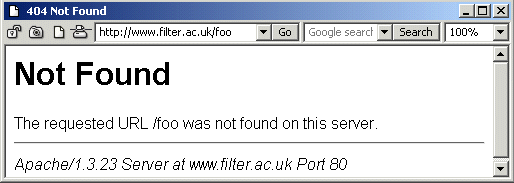
Figure 1: A Basic 404 Error Message
An example of a richer 404 error page is illustrated. In this example the 404 page is branded with the Web site's colour scheme, contains the Web site's standard navigational facility and provide help information.
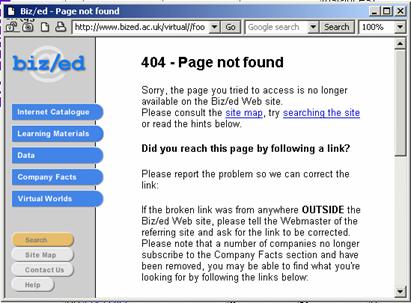
Figure 2: A Richer 404 Error Message
It is possible to define a number of types of 404 error pages:
An article on 404 error pages, based on a survey of 404 pages in UK Universities is available at <http://www.ariadne.ac.uk/issue20/404/>. An update is available at <http://www.ariadne.ac.uk/issue32/web-watch/>.
This document provides advice on how the HTML <link> element can be used to improve the navigation of Web sites.
The purpose of the HTML <link> element is to specify relationships with other documents. Although not widely used the <link> element provides a mechanism for improving the navigation of Web sites.
The <link> element should be included in the <head> of HTML documents. The syntax of the element is: <link rel=”relation” href=”url”>. The key relationships which can improve navigation are listed below.
| Relation | Function |
| next | Refers to the next document in a linear sequence of documents. |
| prev | Refers to the previous document in a linear sequence of documents. |
| home | Refers to the home page or the top of some hierarchy. |
| first | Refers to the first document in a collection of documents. |
| contents | Refers to a document serving as a table of contents. |
| help | Refers to a document offering help. |
| glossary | Refers to 1 document providing a glossary of terms that pertain to the current document. |
Use of the <link> element enables navigation to be provided in a consistent manner as part of the browser navigation area rather than being located in an arbitrary location in the Web page. This has accessibility benefits. In addition browsers can potential enhance the performance by pre-fetching the next page in a sequence.
A reason why <link> is not widely used has been the lack of browser support. This has changed recently and support is now provided in the latest versions of the Opera and Netscape/Mozilla browsers and by specialist browsers (e.g. iCab and Lynx).
Since the <link> element degrades gracefully (it does not cause problems for old browser) use of the <link> element will cause no problems for users of old browsers.
An illustration of how the <link> element is implemented in Opera is shown below.
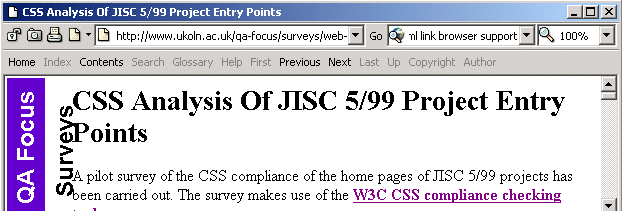
Figure 1: Browser Support For The <link> Element
In Figure 1 a menu of navigational aids is available. The highlighted options (Home, Contents, Previous and Next) are based on the relationships which have been defined in the document. Users can use these navigational options to access the appropriate pages, even though there may be no corresponding links provided in the HTML document.
It is important that the link relationships are provided in a manageable way. It would not be advisable to create link relationships by manually embedding them in HTML pages if the information is liable to change.
It is advisable to spend time in defining the on key navigational locations, such as the Home page (is it the Web site entry point, or the top of a sub-area of the Web site). Such relationships may be added to templates included in SSIs. Server-side scripts are a useful mechanism for exploiting other relationships, such as Next and Previous - for example in search results pages.
Additional information is provided at
<http://www.ukoln.ac.uk/qa-focus/documents/briefings/briefing-10/>.
It is desirable to measure usage of your project Web site as this can give an indication of its effectiveness. Measuring how the Web site is being used can also help in identifying the usability of the Web site. Monitoring errors when users access your Web site can also help in identifying problem areas which need to be fixed.
However, as described in this document, usage statistics can be misleading. Care must be taken in interpreting statistics. As well as usage statistics there are a number of other types of performance indicators which can be measured.
It is also important that consistent approaches are taken in measuring performance indicators in order to ensure that valid comparisons can be made with other Web sites.
Web statistics are produced by the Web server software. The raw data will normally be produced by default - no additional configuration will be needed to produce the server's default set of usage data.
The server log file records information on requests (normally referred to as a "hit") for a resource on the web server. Information included in the server log file includes the name of the resource, the IP address (or domain name) of the user making the request, the name of the browser (more correctly, referred to as the "user agent") issuing the request, the size of the resource, date and time information and whether the request was successful or not (and an error code if it was not). In addition many servers will be configured to store additional information, such as the "referer" (sic) field, the URL of the page the user was viewing before clicking on a link to get to the resource.
A wide range of Web statistical analysis packages are available to analyse Web server log files [1]. A widely used package in the UK HE sector is WebTrends [2].
An alternative approach to using Web statistical analysis packages is to make use of externally-hosted statistical analysis services [3]. This approach may be worth considering for projects which have limited access to server log files and to Web statistical analysis software.
In order to ensure that Web usage figures are consistent it is necessary to ensure that Web servers are configured in a consistent manner, that Web statistical analysis packages process the data consistently and that the project Web site is clearly defined.
You should ensure that (a) the Web server is configured so that appropriate information is recorded and (b) that changes to relevant server options or data processing are documented.
You should be aware that the Web usage data does not necessarily give a true indication of usage due to several factors:
Despite these reservations collecting and analysing usage data can provide valuable information.
Web usage statistics are not the only type of performance indicator which can be used. You may also wish to consider:
With all of the indicators periodic reporting will allow trends to be detected.
It may be useful to determine a policy on collection and analysis of performance indicators for your Web site prior to its launch.
With the growing popularity in use of mobile devices and pervasive networking on the horizon we can expect to see greater use of PDAs (Personal Digital Assistants) for accessing Web resources.
This document describes a method for accessing a Web site on a PDA. In addition this document highlights issues which may make access on a PDA more difficult.
AvantGo is a well-known Web based service which provides access to Web resources on a PDA such as a Palm or Pocket PC.
The AvantGo service is freely available from <http://www.avantgo.com/>.
Once you have registered on the service you can provide access to a number of dedicated AvantGo channels. In addition you can use an AvantGo wizard to provide access to any publicly available Web resources on your PDA.
An example of two Web sites showing the interface on a Palm is illustrated.
If you have a PDA you may find it useful to use it to provide access to your Web site, as this will enable you to access resources when you are away from your desktop PC. This may also be useful for your project partners. In addition you may wish to encourage users of your Web site to access it in this way.
AvantGo uses robot software to access your Web site and process it in a format suitable for viewing on a PDA, which typically has more limited functionality, memory, and viewing area than a desktop PC. The robot software may not process a number of features which may be regarded as standard on desktop browsers, such as frames, JavaScript, cookies, plugins, etc.
The ability to access a simplified version of your Web site can provide a useful mechanism for evaluating the ease with which your Web site can be repurposed and for testing the user interface under non-standard environments.
You should be aware of the following potential problem areas:
As well as providing enhanced access to your Web site use of tools such as AvantGo can assist in testing access to your Web site. If your Web site makes use of open standards and follows best practices it is more likely that it will be usable on a PDA and by other specialist devices.
You should note, however, that use of open standards and best practices will not guarantee that a Web site will be accessible on a PDA.
A project's Web site address will provide, for many, the best means for finding out about the project, reading abouts its activities and using the facilities which the projects provides. It is therefore highly desirable that a project's Web site address remains stable. However there may be occasions when it is felt necessary to change a project's Web site address. This document provides advice on best practices which should help to minimise problems.
Ideally the entry point for project's Web site will be short and memorable. However this ideal is not always achievable. In practice we are likely to find that institutional or UKERNA guidelines on Web addresses preclude this option.
The entry point should be a simple domain name such as <http://www.project.ac.uk/> or a directory such as <http://www.university.ac.uk/depts/library/project/>. Avoid use of a file name such as <http://www.university.ac.uk/depts/library/project/index.html> as this makes the entry point longer and less memorable and can cause problems if the underlying technologies change.
If the address of a project Web site is determined by institutional policies, it is still desirable to avoid changing the address unnecessarily. However there may be reasons why a change to the address is needed.
Projects should consider potential changes to the Web site address before the initial launch and seek to avoid future changes or to minimise their effect. However if this is not possible the following advice is provided:
This information will give you an indication of the impact a change to your Web site address may have. If you intend to change the address you should:
It is advisable to check links prior to the change and afterwards, to ensure that no links are broken during the change. You should seek to ensure that links on your Web site go to the new address.
When the funding for a project finishes it is normally expected that the project's Web site will continue to be available in order to ensure that information about the project, the project's findings, reports, deliverables, etc. are still available.
This document provides advice on "mothballing" a project Web site.
The entry point for the project Web site should make it clear that the project has finished and that there is no guarantee that the Web site will be maintained.
You should seek to ensure that dates on the Web site include the year - avoid content which says, for example, "The next project meeting will be held on 22 May".
You may also find it useful to make use of cascading style sheets (CSS) which could be used to, say, provide a watermark on all resources which indicate that the Web site is no longer being maintained.
Although software is not subject to deterioration due to aging, overuse, etc. software products can cease to work over time. Operating systems upgrades, upgrades to software libraries, conflicts with newly installed software, etc. can all result in software products used on a project Web site to cease working.
It is advisable to adopt a defensive approach to software used on a Web site.
There are a number of areas to be aware of:
We have outlined a number of areas in which a project Web site may degrade in quality once the project Web site has been "mothballed".
In order to minimise the likelihood of this happening and to ensure that problems can be addressed with the minimum of effort it can be useful to adopt a systematic set of procedures when mothballing a Web site.
It can be helpful to run a link checker across your Web site. You should seek to ensure that all internal links (links to resources on your own Web site) work correctly. Ideally links to external resources will also work, but it is recognised that this may be difficult to achieve. It may be useful to provide a link to a report of the link check on your Web site.
It would be helpful to provide documentation on the technical architecture of your Web site, which describes the server software used (including use of any unusual features), use of server-side scripting technologies, content management systems, etc.
It may also be useful to provide a mirror of your Web site by using a mirroring package or off-line browser. This will ensure that there is a static version of your Web site available which is not dependent on server-side technologies.
You should give some thought to contact details provided on the Web site. You will probably wish to include details of the project staff, partners, etc. However you may wish to give an indication if staff have left the organisation.
Ideally you will provide contact details which are not tied down to a particular person. This may be needed if, for example, your project Web site has been hacked and the CERT security team need to make contact.
Ideally you will ensure that your plans for mothballing your Web site are developed when you are preparing to launch your Web site!
This document provides advice on configuring popular Web browsers in order to ensure your Web site is widely accessible. The document covers Internet Explorer 7.0, Firefox 3 and Opera 9.6 running on Microsoft Windows.
Some browsers do not support JavaScript. Some organisations / individuals will disable JavaScript due to security concerns.
| Browser | Technique |
|---|---|
| Internet Explorer | Select Tools menu and Internet Options option. Select the Security tab, choose the Internet icon choose the Custom level option. Scroll to the Scripting option and choose the Disable (or Prompt) option. |
| Firefox | Select Tools menu and Options option. Open Content, unselect the Enable Javascript option and select OK. |
| Opera | Select File menu and choose Preferences option. Choose the Multimedia option, disable JavaScript option and select OK. |
Some individuals will need to resize the display in order to read the information provided.
| Browser | Technique |
|---|---|
| Internet Explorer | Select View menu and choose Text Size option. |
| Firefox | Select View menu and choose the Zoom option. Choose the option to Zoom in. Repeat using Zoom out |
| Opera | Select View menu and choose Zoom option. Then zoom by a factor or, say, 50% and 150%. |
Some people cannot see images and some may disable images for performance or privacy reasons.
| Browser | Technique |
|---|---|
| Internet Explorer | Select Tools menu and Internet Options option. Uncheck the Show pictures automatically option. |
| Firefox | Select View menu and Options option. Open the Content tab, uncheck the Load images automatically tab and select OK. |
| Opera | Select File menu and choose Preferences option. Choose Multimedia option, select the Show images pull-down menu and choose the Show no images option and select OK. |
Some browsers and assistive technologies may not support pop-up windows. Individuals may disable pop-up windows due to their misuse by some commercial sites.
| Browser | Technique |
|---|---|
| Internet Explorer | Select the Tools tab and Pop-Up Blocker option. Ensure that the Pop-Up Blocker option is selected. |
| Firefox | Select Tools menu and Options option. Select the Content tab and click on the Block pop-up windows option. |
| Opera | Select File menu and choose Preferences option. Choose Windows option in the Pop-ups pull-down menu and choose the Refuse Pop-ups option and select OK. |
You should use the procedures in a systematic way: for example as part of a formal testing procedure in which specific tasks are carried out.
Bookmarklets are browser extension may extend the functionality of a browser. Many accessibility bookmarklets are available (known as Firefox Extensions for the Firefox browser). It is suggested that such tools are used in accessibility testing. See Interfaces To Web Testing Tools at <http://www.ariadne.ac.uk/issue34/web-focus/>
As described in other QA Focus briefing document [1] [2] it is important to ensure that Web sites comply with standards and best practices in order to ensure that Web sites function correctly, to provide widespread access to resources and to provide interoperability. It is therefore important to check Web resources for compliance with standards such as HTML, CSS, accessibility guidelines, etc.
This document summarises different models for such testing tools and describes a model which is based on provided an interface to testing tools through a Web browsers address bar.
There are a variety of models for testing tools:
Although a variety of models are available, they all suffer from the lack of integration will the normal Web viewing and publishing process. There is a need to launch a new application or go to a new Web resource in order to perform the checking.
A URI interface to testing tools avoids the barrier on having to launch an application or move to a new Web page. With this approach if you wish to validate a page on your Web site you could simply append an argument (such as ,validate) in the URL bar when you are viewing the page. The page being viewed will then be submitted to a HTML validation service. This approach can be extended to recursive checking: appending ,rvalidate to a URI will validate pages beneath the current page.
This approach is illustrated. Note that this technique can be applied to a wide range of Web-based checking services including:
This approach has been implemented on the QA Focus Web site (and on UKOLN's Web site). For a complete list of tools available append ,tools to any URL on the UKOLN Web site or see [3].
This approach is implemented using a simple Web server redirect. This has the advantage of being implemented in a single place and being available for use by all visitors to the Web site.
For example to implement the ,validate URI tool the following line should be added to the Apache configuration file:
RewriteRule /(.*),validate http://validator.w3.org/check?uri=http://www.foo.ac.uk/$1 [R=301]where www.foo.ac.uk should be replaced by the domain name of your Web server (note that the configuration details should be given in a single line).
This approach can also be implemented on a Microsoft IIS platform, as described at [3].
The QA Focus Toolkits are an online resource which can be used as a checklist to ensure that your project or service has addressed key areas which can help to ensure that your deliverables are fit for its intended purpose, widely accessible and interoperable and can be easily repurposed.
The QA For Web Toolkit is one of several toolkits which have been developed by the QA Focus project to support JISC's digital library programmes. This toolkit addresses compliance with standards and best practices for Web resources.
The QA For Web Toolkit is available from <http://www.ukoln.ac.uk/qa-focus/toolkit/>. The toolkit is illustrated in Figure 1:
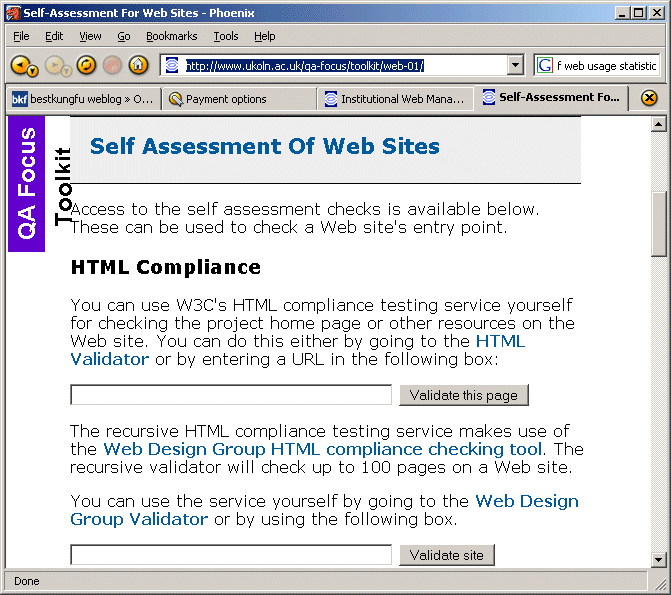
Figure 1: The QA For Web Toolkit
The toolkit addresses the following key areas
The toolkit can provide access to a set of online checking services.
You should seek to ensure that systematic checking is embedded within your work. If you simply make occasional use of such tools you may fail to spot significant errors. Ideally you will develop a systematic set of workflow procedures which will ensure that appropriate checks are carried out consistently.
You should also seek to ensure that you implement systematic checks in areas in which automated tools are not appropriate or available.
You may wish to use the results you have found for audit trails of compliance of resources on your Web site.
The QA For Web Toolkit described in this document provides a single interface to several online checking services hosted elsewhere. The QA Focus project and its host organisations (UKOLN and AHDS) have no control over the remote online checking services. We cannot guarantee that the remote services will continue to be available.
Further toolkits are available at <http://www.ukoln.ac.uk/qa-focus/toolkit/>
.RSS is increasingly being used to provide news services and for syndication of content. The document provides a brief description of RSS news feed technologies which can be used as part of a communications strategy by projects and within institutions. The document summarises the main challenges to be faced when considering deployment of news feeds.
News feeds are an example of automated syndication. News feed technologies allow information to be automatically provided and updated on Web sites, emailed to users, etc. As the name implies news feeds are normally used to provide news; however the technology can be used to syndicate a wide range of information.
The BBC ticker [1] is an example of a news feed application. A major limitation with this approach is that the ticker can only be used with information provided by the BBC.
The RSS standard was developed as an open standard for news syndication, allowing applications to display news supplied by any RSS provider.
RSS is a lightweight XML application (see RSS fragment). Ironically the RSS standard proved so popular that it led to two different approaches to its standardisation. So RSS now stands for RDF Site Summary and Really Simple Syndication (in addition to the original phrase Rich Site Summary).
<title>BBC News</title>
<url>http://news.bbc.co.uk/nol/shared/img/bbc_news_120x60.gif</url>
<link>http://news.bbc.co.uk/</link>
<item>
<title>Legal challenge to ban on hunting</title>
<description>The Countryside Alliance prepares a legal challenge to Parliament Act ... </description>
<link>http://news.bbc.co.uk/go/click/rss/0.91/public/-/1/hi/... </link>.
Figure 1: Example Of An RSS File
Despite this confusion, in practice many RSS viewers will display both versions of RSS (and the emerging new standard, Atom).

There are a large number of RSS reader software applications available [2] and several different models. An example of a scrolling RSS ticker is also shown above [3]. RSSxpress [4] (illustrated below) is an example of a Web-based reader which embeds an RSS feed in a Web page.
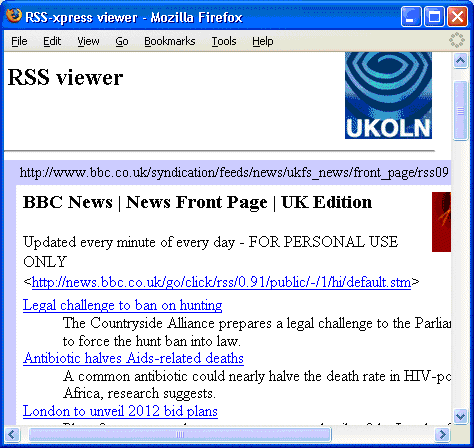
In addition to these two approaches, RSS readers are available with an email-style approach for the Opera Web browser [5] and Outlook [6] and as extensions for Web browsers [7] [8].
There are several approaches to the creation of RSS news feeds. Software such as RSSxpress can also be used to create and edit RSS files. In addition there are a number of dedicated RSS authoring tools, including standalone applications and browser extensions (see [9]). However a better approach may be to generate RSS and HTML files using a CMS or to transform between RSS and HTML using languages such as XSLT.
Issues which need to be addressed when considering use of RSS include:
Wiki technologies are increasingly being used to support development work across distributed teams. This document aims to give a brief description of Wikis and to summarise the main challenges to be faced when considering the deployment of Wiki technologies.
A Wiki or wiki (pronounced "wicky" or "weekee") is a Web site (or other hypertext document collection) that allows a user to add content. The term Wiki can also refer to the collaborative software used to create such a Web site [1].
The key characteristics of typical Wikis are:
The Wikipedia is the largest and best-known Wiki - see <http://www.wikipedia.org/>.
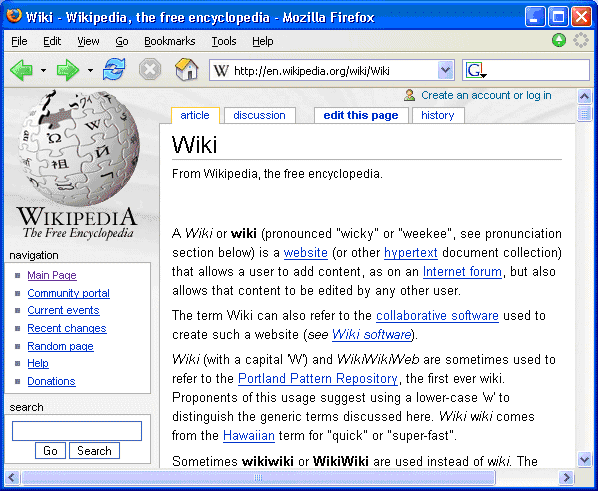
The Wikipedia provides a good example of a community Wiki in which content is provided by contributors around the world.
The Wikipedia appears to have succeeded in providing an environment and culture which has minimised the dangers of misuse. Details of the approaches taken on the Wikipedia are given on the Wikipedia Web site [2].
Wikis can be used for a number of purposes:
As described in [6] advantages of Wikis may include:
Disadvantages of Wikis include:
An identifier is any label that allows us to find a resource. One of the best-known identifiers is the International Standard Book Number (ISBN), a unique ten-digit number assigned to books and other publications. On the Internet the most widely known identifier is the Uniform Resource Locator (URL), which allows users to find a resource by listing a protocol, domain name and, in many cases, file location.
A persistent identifier is, as the name suggests, an identifier that exists for a very long time. It should at the very least be globally unique and be used as a reference to the resource beyond the resource's lifetime. URLs, although useful, are not very persistent. They only provide a link to the resource's location at the moment in time they are cited, if the resource moves they no longer apply. The issue of 'linkrot' on the Internet (broken links to resources), along with the need for further interoperability has led to the search for more persistent identifiers for digital resources.
The International Digital Object Identifier (DOI) Foundation [1] states that there are two principles for persistent identification:
A Uniform Resource Identifier (URI) is the string that is used to identify anything on the Internet. URLs along with Uniform Resource Names (URNs) are both types of URI. A URN is a name with global scope and does not necessarily imply a location. A URN will include a Namespace Identifier (NID) Code and a Namespace Specific String (NSS). The NID specifies the identification system used (e.g. ISBN) and the NSS is local code that identifies a resource. For someone to find a resource using a URN they must use a resolver service.
Persistent URLs (PURLs) [2] have been developed by the Online Computer Library Centre (OCLC) as an interim measure for Internet resources until the URN framework is well established. A PURL is functionally a URL, but rather than pointing at a location points at a resolution service, which redirects the user to the appropriate URL. If the URL changes it just needs to be amended in the PURL resolution service
Example: http://purl.oclc.org/OCLC/PURL/summary
This is made up of the protocol (http), the resolver address
(http://purl.oclc.org/) and the user-assigned name (OCLC/PURL/summary).
The Digital Object Identifier (DOI) system was initiated by the Association of American publishers in an attempt to assist the publishing community with copyright and electronic commerce. DOIs are described by the International DOI Foundation, who manage them, as persistent, interoperable, actionable identifiers. They are persistent because they identify an object as a first-class entity (not just the location), they are interoperable because they are designed with the future in mind and they are actionable because they allow a user to locate a resource by resolution using the Handle System. The Handle System, developed by the Corporation for National Research Initiatives (CNRI) includes protocols that enable a distributed computer system to store handles of digital resources and resolve them into a location. DOIs can be assigned by a Registration Agency (RA), which provides services for a specific user community and may charge fees. The main RA for the publishing community is CrossRef [3].
Example: 10.1000/123456
This is made up of the prefix (10.1000) which is the string assigned
to an organisation that registering DOIs and the suffix (123456) which
is a unique (to a given prefix) alphanumeric string, which could be an existing identifier.
While DOIs hold great potential for helping many information communities enhance interoperability they have yet to reach full maturity. There are still many unresolved issues, such as their resolution (how users use them in to receive a Web page), registration of the DOI system, the persistence of the International DOI Foundation as an organisation and what exactly their advantages are over handles or PURLs. Until these matters are resolved they will remain little more than a good idea for most communities.
However the concept of persistent identifiers is still imperative to a working Internet. While effort is put into finding the best approach there is much that those creating Web pages can do to ensure that their URIs are persistent. In 1998 Tim Berners-Lee coined the phrase Cool URIs to describe URIs which do not change. His article explains the methods a Webmaster would use to design a URI that will stand the test of time. As Berners-Lee elucidates "URIs don't change: people change them." [4].
Information on performance indicators for Web sites has been published elsewhere [1] [2]. This document provides additional information on the specific need for usage statistics for Web sites and provides guidance on ways of ensuring the usage statistics can be comparable across Web sites.
When a user accesses a Web page several resources will normally be downloaded to the user (the HTML file, any embedded images, external style sheet and JavaScript files, etc.). The Web server will keep a record of this, including the names of the files requested and the date and time, together with some information about the user's environment (e.g. type of browser being used).
Web usage analysis software can then be used to provide overall statistics on usage of the Web site. As well as giving an indication of the overall usage of a Web site, information can be provided on the most popular pages, the most popular entry points, etc.
Usage statistics can be used to give an indication of the popularity of Web resources. Usage statistics can be useful if identifying successes or failures in dissemination strategies or in the usability of a Web site.
Usage statistics can also be useful to system administrators who may be able to use the information (and associated trends) in capacity planning for server hardware and network bandwidth.
Aggregation of usage statistics across a community can also be useful in profiling the impact of Web services within the community.
Although Web site usage statistics can be useful in a number of areas, it is important to be aware of the limitations of usage statistics. Although initially it may seem that such statistics should be objective and unambiguous, in reality this is not the case.
Some of the limitations of usage statistics include:
Although Web site usage statistics cannot be guaranteed to provide a clear and unambiguous summary of Web site usage, this does not mean that the data should not be collected and used. There are parallels with TV viewing figures which are affected by factors such as video recording. Despite such known limitations, this data is collected and used in determining advertising rates.
The following advice may be useful:
You should ensure that you document the approaches taken (e.g. details of the analysis tool used) and any processing carried out on the data (e.g. removing robot traffic or access from within the organisation). Ideally you will make any changes to the processing, but if you do you should document this.
Traditional analysis packages process server log files. An alternative approach is to make use of an externally-hosted usage analysis service. These services function by providing a small graphical image (which may be invisible) which is embedded on pages on your Web site. Accessing a page causes the graphic and associated JavaScript code, which is hosted by a commercial company, to be retrieved. Since the graphic is configured to be non-cachable, the usage data should be more reliable. In addition the JavaScript code can allow additional data to be provided, such as additional information about the end users PC environment.
Web services are a class of Web application, published, located and accessed via the Web, that communicates via an XML (eXtensible Markup Language) interface [1]. As they are accessed using Internet protocols, they are available for use in a distributed environment, by applications on other computers.
The idea of Internet-accessible programmatic interfaces, services intended to be used by other software rather than as an end product, is not new. Web services are a development of this idea. The name refers to a set of standards and essential specifications that simplify the creation and use of such service interfaces, thus addressing interoperability issues and promoting ease of use.
Well-specified services are simple to integrate into larger applications, and once published, can be used and reused very effectively and quickly in many different scenarios. They may even be aggregated, grouped together to produce sophisticated functionality.
The Google spellchecker service, used by the Google search engine, suggests a replacement for misspelt words. This is a useful standard task; simply hand it a word, and it will respond with a suggested spelling correction if one is available. One might easily imagine using the service in one's own search engine, or in any other scenario in which user input is taken, perhaps in an intelligent "Page not found" error page, that attempts to guess at the correct link. The spellchecker's availability as a Web service simplifies testing and adoption of these ideas.
Furthermore, the use of Web services is not limited to Web-based applications. They may also usefully be integrated into a broad spectrum of other applications, such as desktop software or applets. Effectively transparent to the user, Web service integration permits additional functionality or information to be accessed over the Web. As the user base continues to grow, many development suites focus specifically on enabling the reuse and aggregation of Web services.
'Web services' refers to a potentially huge collection of available standards, so only a brief overview is possible here. The exchange of XML data uses a protocol such as SOAP or XML-RPC. Once published, the functionality of the Web service may be documented using one of a number of emerging standards, such as WSDL, the Web Service Description Language.
WSDL provides a format for description of a Web service interface, including parameters, data types and options, in sufficient detail for a programmer to write a client application for that service. That description may be added to a searchable registry of Web services.
A proposed standard for this purpose is UDDI (Universal Description, Discovery and Integration), described as a large central registry for businesses and services. Web services are often seen as having the potential to 'flatten the playing field', and simplify business-to-business operations between geographically diverse entities.
Due to the popularity of the architecture, many resources exist to support the development and use of Web services in a variety of languages and environments. The plethora of available standards may pose a problem, in that a variety of protocols and competing standards are available and in simultaneous use. Making that choice depends very much on platform, requirements and technical details.
Although Web services promise many advantages, there are still ongoing discussions regarding the best approaches to the underlying technologies and their scope.
The term 'Web 2.0' was coined to define an emerging pattern of new uses of the Web and approaches to the Web development, rather than a formal upgrade of Web technologies as the 2.0 version number may appear to signify. The key Web 2.0 concepts include:
The key application areas which embody the Web 2.0 concepts include:
Asynchronous JavaScript and XML (AJAX) is an umbrella term for a collection of Web development technologies used to create interactive Web applications, mostly W3C standards (the XMLHttpRequest specification is developed by WHATWG [1]:
Since data can be sent and retrieved without requiring the user to reload an entire Web page, small amounts of data can be transferred as and when required. Moreover, page elements can be dynamically refreshed at any level of granularity to reflect this. An AJAX application performs in a similar way to local applications residing on a user's machine, resulting in a user experience that may differ from traditional Web browsing.
Recent examples of AJAX usage include Gmail [2], Flickr [3] and 24SevenOffice [4]. It is largely due to these and other prominent sites that AJAX has become popular only relatively recently - the technology has been available for some time. One precursor was dynamic HTML (DHTML), which twinned HTML with CSS and JavaScript but suffered from cross-browser compatibility issues. The major technical barrier was a common method for asynchronous data exchange; many variations are possible, such as the use of an "iframe" for data storage or JavaScript Object Notation for data transmission, but the wide availability of the XMLHttpRequest object has made it a popular solution. AJAX is not a technology, rather, the term refers to a proposed set of methods using a number of existing technologies. As yet, there is no firm AJAX standard, although the recent establishment of the Open AJAX group [5], supported by major industry figures such as IBM and Google, suggests that one will become available soon.
AJAX applications can benefit both the user and the developer. Web applications can respond much more quickly to many types of user interaction and avoid repeatedly sending unchanged information across the network. Also, because AJAX technologies are open, they are supported in all JavaScript-enabled browsers, regardless of operating system - however, implementation differences of the XMLHttpRequest between browsers cause some issues, some using an ActiveX object, others providing a native implementation. The upcoming W3C 'Document Object Model (DOM) Level 3 Load and Save Specification' [6] provides a standardised solution, but the current solution has become a de facto standard and is therefore likely to be supported in future browsers.
Although the techniques within AJAX are relatively mature, the overall approach is still fairly new and there has been criticism of the usability of its applications; further information on this subject is available in the Ajax and Usability QA Focus briefing document [7]. One of the major causes for concern is that JavaScript needs to be enabled in the browser for AJAX applications to work. This setting is out of the developer's control and statistics show that currently 10% of browsers have JavaScript turned off [8]. This is often for accessibility reasons or to avoid scripted viruses.
The popularity of AJAX is due to the many advantages of the technology, but several pitfalls remain related to the informality of the standard, its disadvantages and limitations, potential usability issues and the idiosyncrasies of various browsers and platforms. However, the level of interest from industry groups and communities means that it is undergoing active and rapid development in all these areas.
OPML stands for Outline Processor Markup Language. OPML was originally developed as an outlining application by Radio Userland. However it has been adopted for a range of other applications, in particular providing an exchange format for RSS.
This document describes the OPML specification and provides examples of use of OPML for the exchange of RSS feeds.
The OPML specification [1] defines an outline as a hierarchical, ordered list of arbitrary elements. The specification is fairly open which makes it suitable for many types of list data. The OPML specification is very simple, containing the following elements:
OPML has various shortcomings:
OPML can be used in a number of application areas. One area of particular interest is in the exchange of RSS files. OPML can be used to group together related RSS feeds. RSS viewers which provide support for OPML can then be used to read in the group, to avoid having to import RSS files individually. Similarly RSS viewers may also provide the ability to export groups of RSS files as a single OPML file.
OPML viewers can be used to view and explore OPML files. OPML viewers have similar functionality as RSS viewers, but allow groups of RSS files to be viewed.
The QA Focus Web site makes use of RSS and OPML to provide syndication of the key QA Focus resources [2]. This is illustrated in Figure 1, which shows use of the Grazr inline OPML viewer [3]. This application uses JavaScript to read and display the OPML data.
Other OPML viewers include Optimal OPML [4] and OPML Surfer [5].
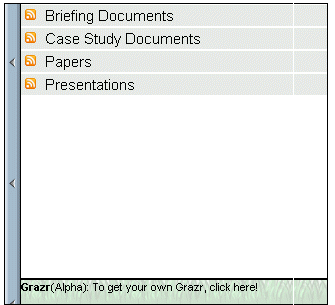
Figure 1: Grazr
It should be noted that OPML is a relatively new format and only limited experiences have been gained in its usage. Organisations who wish to make exploit the benefits of OPML should seek to minimise any risks associated with use of the format and develop migration strategies if richer or more robust alternative formats become available.
This briefing document makes use of information published in the OPML section on Wikipedia [6].
This briefing document provides advice for Web authors, developers and policy makers who are considering making use of Web 2.0 services which are hosted by external third party services. The document describes an approach to risk assessment and risk management which can allow the benefits of such services to be exploited, whilst minimising the risks and dangers of using such services.
Note that other examples of advice are also available [1] [2].
This document covers use of third party Web services which can be used to provide additional functionality or services without requiring software to be installed locally. Such services include:
Advantages of using such services include:
Possible disadvantages of using such services include:
A number of risks associated with making use of Web 2.0 services are given below, together with an approach to managing the dangers of such risks.
| Risk | Assessment | Management |
|---|---|---|
| Loss of service (e.g. company becomes bankrupt, closed down, ...) | Implications if service becomes unavailable. Likelihood of service unavailability. |
Use for non-mission critical services. Have alternatives readily available. Use trusted services. |
| Data loss | Likelihood of data loss. Lack of export capabilities. |
Evaluation of service. Non-critical use. Testing of export. |
| Performance problems. Unreliability of service. |
Slow performance | Testing. Non-critical use. |
| Lack of interoperability. | Likelihood of application lock-in. Loss of integration and reuse of data. |
Evaluation of integration and export capabilities. |
| Format changes | New formats may not be stable. | Plan for migration or use on a small-scale. |
| User issues | User views on services. | Gain feedback. |
Note that in addition to risk assessment of Web 2.0 services, there is also a need to assess the risks of failing to provide such services.
A risk management approach [3] was taken to use of various Web 2.0 services on the Institutional Web Management Workshop 2006 Web site.
This briefing document provides advice on approaches to measuring the impact of a service provided by a Web site.
The document describes an approach to risk assessment and risk management which can allow the benefits of such services to be exploited, whilst minimising the risks and dangers of using such services.
A traditional approach to measuring the impact of a Web site is to report on Web server usage log files [1]. Such data can provide information such as an indication of trends and growth in usage; how visitors arrived at the Web site; how users viewed pages on your Web site and details on the browser technologies used by your visitors.
However although such information can be useful, it is important to recognise that the underlying data and the data analysis techniques used may be flawed [2]. For example:
It should also be noted that care must be taken when aggregating usage statistics:
So although analysis of Web site usage data may be useful, the findings need to be carefully interpreted.
Although Web site usage analysis may have flaws, there are other approaches which can be used to measure the impact of a Web site: Such alternative can be used to complement Web usage analysis.
Possible disadvantages of using such services include:
In order to maximise the benefits, you may find it useful to develop an Impact Analysis Strategy. This should ensure that you are aware of the strengths and weaknesses of the approaches you plan to use, have mechanisms for gathering information in a consistent and effective manner and that appropriate tools and services are available.
This document provides an introduction to microformats, with a description of what microformats are, the benefits they can provide and examples of their usage. In addition the document discusses some of the limitations of microformats and provides advice on best practices for use of microformats.
"Designed for humans first and machines second, microformats are a set of simple, open data formats built upon existing and widely adopted standards. Instead of throwing away what works today, microformats intend to solve simpler problems first by adapting to current behaviors and usage patterns (e.g. XHTML, blogging)." [1].
Microformats make use of existing HTML/XHTML markup: Typically the <span> and <div> elements and class attribute are used with agreed class name (such as vevent, dtstart and dtend to define an event and its start and end dates). Applications (including desktop applications, browser tools, harvesters, etc.) can then process this data.
Popular examples of microformats include:
An example which illustrates the commercial takeup of the hCalendar microformat is its use with the World Cup 2006 fixture list [4]. This application allows users to choose their preferred football team. The fixtures are marked up using hCalendar and can be easily added to the user's calendaring application.
Microformats have been designed to make use of existing standards such as HTML. They have also been designed to be simple to use and exploit. However such simplicity means that microformats have limitations:
Despite their limitations microformats can provide benefits to the user community. However in order to maximise the benefits and minimise the risks associated with using microformats it is advisable to make use of appropriate best practices. These include:
This document describes a user-focussed approach to Web accessibility in which the conventional approach to Web accessibility (based on use of WAI WCAG guidelines) can be applied within a wider context.
The conventional approach to Web accessibility is normally assumed to be provided by implementation of the Web Content Accessibility Guidelines (WCAG) which have been developed by the Web Accessibility Initiative (WAI).
In fact the WCAG guidelines are part of a set of three guidelines developed by WAI, the other guidelines being the Authoring Tools Accessibility Guidelines (ATAG) and the User Agent Accessibility Guidelines (UAAG). The WAI approach is reliant on full implementation of these three sets of guidelines.
Although WAI has been a political success, with an appreciation of the importance of Web accessibility now widely acknowledged, and has provided a useful set of guidelines which can help Web developers produce more accessible Web sites, the WAI model and the individual guidelines have their flaws, as described by Kelly et al [1]:
Although the WAI approach has its flaws (which is understandable as this was an initial attempt to address a very difficult area) it needs to be recognised that WCAG guidelines are valuable. The challenge is to develop an approach which makes use of useful WCAG guidelines in a way which can be integrated with others areas of best practices (e.g. including usability, interoperability, etc.) and provides a richer and more usable and accessible experience to the target user community.
In the tangram model for Web accessibility (developed by Sloan, Kelly et al [3]) each piece in the tangram (see below left) represents guidelines in areas such as accessibility, usability, interoperability, etc. The challenge for the Web developer is to develop a solution which is 'pleasing' to the target user community (see below right).

The tangram model provides several benefits:
Wikipedia defines a mashup as "a web application that combines data from more than one source into a single integrated tool" [1]. Many popular examples of mashups make use of the Google Map service to provide a location display of data taken from another source.
As illustrated in a video clip on "What Is A Mashup?" [2] from a programmer's perspective a mashup is based on making use of APIs (application programmers interface). In a desktop PC environment, application programmers make use of operating system functions (e.g. drawing a shape on a screen, accessing a file on a hard disk drive, etc.) to make use of common functions within the application they are developing. A key characteristic of Web 2.0 is the notion of 'the network as the platform'. APIs provided by Web-based services (such as services provided by companies such as Google and Yahoo) can similarly be used by programmers to build new services, based on popular functions the companies may provide. APIs are available for, for example, the Google Maps service and the del.icio.us social book marking service.
Many mashups can be created by simply providing data to Web-based services. As an example, the UK Web Focus list of events is available as an RSS feed as well as a plain HTML page [3]. The RSS feed includes simple location data of the form:
<geo:lat>51.752747</geo:lat>This RSS feed can be fed to mashup services, such as the Acme.com service, to provide a location map of the talks given by UK Web Focus, as illustrated.
Figure 1: Mashup Of Location Of UK Web Focus Events
More sophisticated mashups will require programming expertise. The mashup illustrated which shows the location of UK Universities and data about the Universities [4] is likely to require access to a backend database.
Figure 2: A Google Maps Mashup Showing Location and Data About UK Universities
However a tools are being developed which will allow mashups to be created by people who may not consider themselves to be software developers. Such tools include Yahoo Pipes [5], PopFly [6] and Google Mashup Editor [7].
Paul Walk commented that "The coolest thing to do with your data will be thought of by someone else" [8]. Mashups provide a good example of this concept: if you provide data which can be reused this will allow others to develop richer services which you may not have the resources or expertise to develop. It can be useful, therefore, to seek to both provide structured data for use by others and to avoid software development if existing tools already exist. However you will still need to consider issues such as copyright and other legal issues and service sustainability.
[ Home Page - Surveys - Documents - Presentations - Search ]

Web page by Brian Kelly of UKOLN.
Last Modified 6-August-2012
Email comments to webmaster@ukoln.ac.uk